Know how things work under the hood to be most productif while writing code
Dotnet core is the new Microsoft framework to build app in .net ecosystem, before dotnet core their was .net framework, The original use case for the .NET Framework was developing enterprise Windows applications.
The two most important pillars of the .NET Framework are the Framework Class Library (FCL; a humongous class library that is the backbone of the .NET Framework) and the Common Language Runtime (CLR; the runtime environment of .NET that contains the JIT compiler, garbage collector, primitive data types, and more). In other words, the FCL contains all the libraries you are likely to use, and the CLR executes the code. Later on, Microsoft introduced .NET Core, aimed at multiplatform development.
How c# language is compiled ?
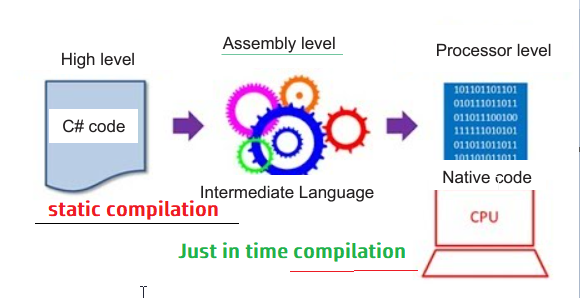
Knowing the entire compilation story prepares you as beginner of .net core , to take advantage of all of C#’s features while understanding some of the pitfalls related to memory and execution. The C# compilation process knows three states (C#, Intermediate Language, and native code) and two stages. Look at showing in the image bellow, going from C# to Common Intermediate Language and going from Intermediate Language to native code:
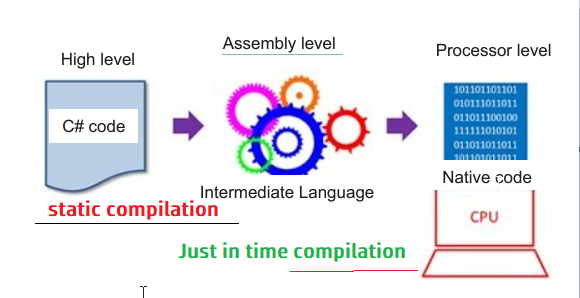
By looking at what it takes to go from one step to the other and follow a method as the compiler and CLR compile the high-level C# code down to runnable native code, we gain an understanding of the complex machine that is C# and .net core now call .net 5. A good understanding of this process is often a resource gap in almost all beginner resources, but advanced resources require you to understand this.
The static compilation is use with JIT(Just In Time Compilation) as follow:
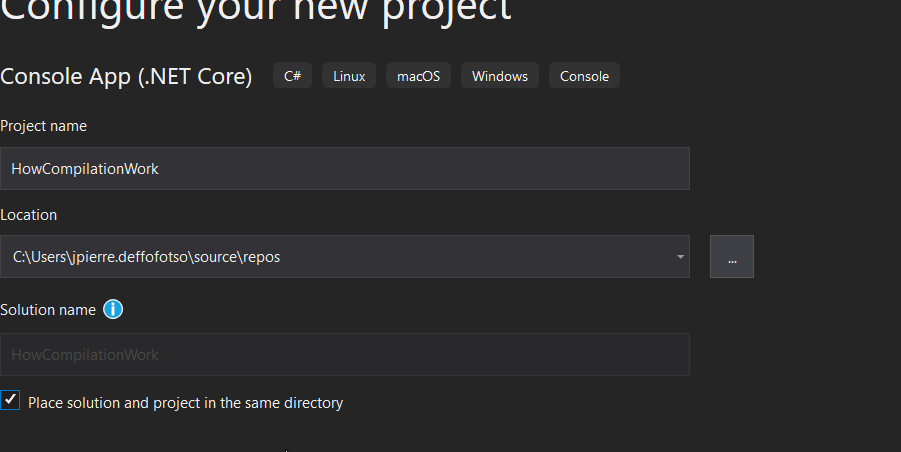
To see how this process work, fire visual studio 2019 and create a “Console application (dotnet core)” app as follow called “HowCompilationWork”:
Modify your main function so that it look like this:
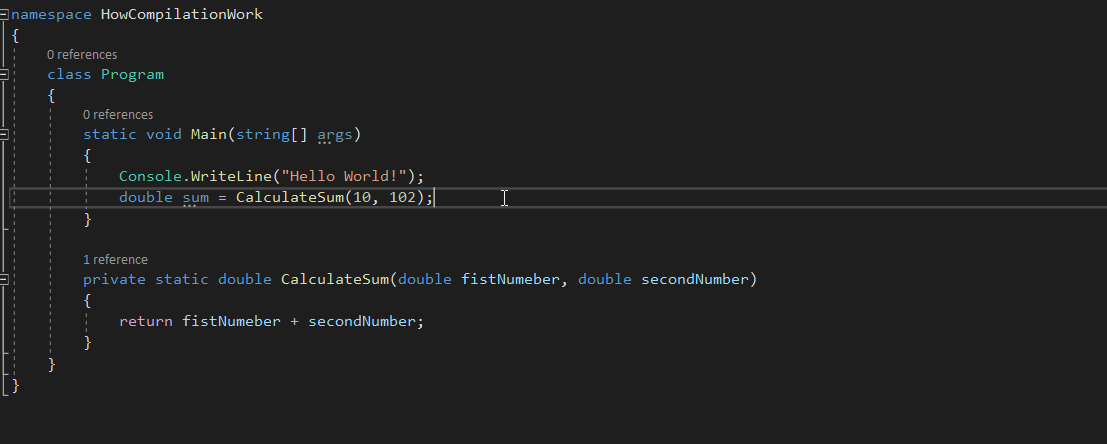
I have just write a simple method (CalulateSum) wich take two number and return the sum, just all, and in the main method I’m trying to call this method, this is sufficient to see how the compilation process go under the hood.
To fully see he compilaion process, open the solution project in powershell . rigth click on the solution and open it in terminal as in the image bellow
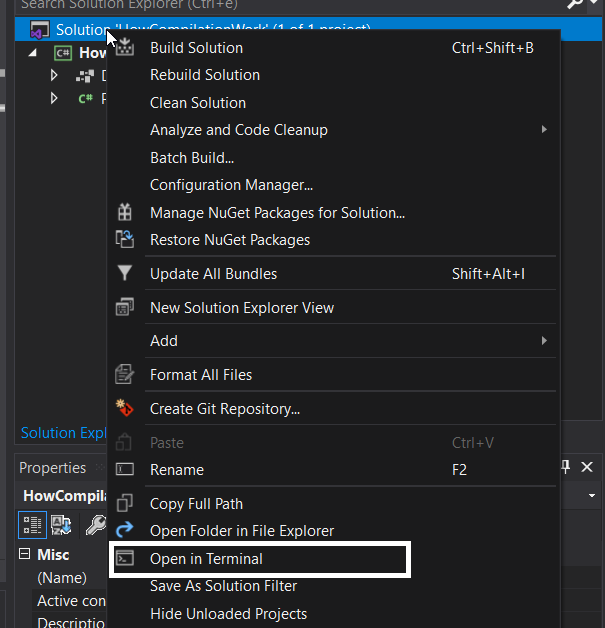
in the terminal just run the command in he image bellow:

After we run the command, the compiler launches. First, the compiler restores all the required dependency packages through the NuGet package manager. Then the command-line tool compiles the project and stores the output in a new folder called bin. Within the bin folder are two potential options for further folders, debug and release, depending on the mode we set the compiler to (you can define your own modes if you want to). By default, the compiler compiles in debug mode. Debug mode contains all the debug information (stored in .pdb files) that you need to step through an application with breakpoints.
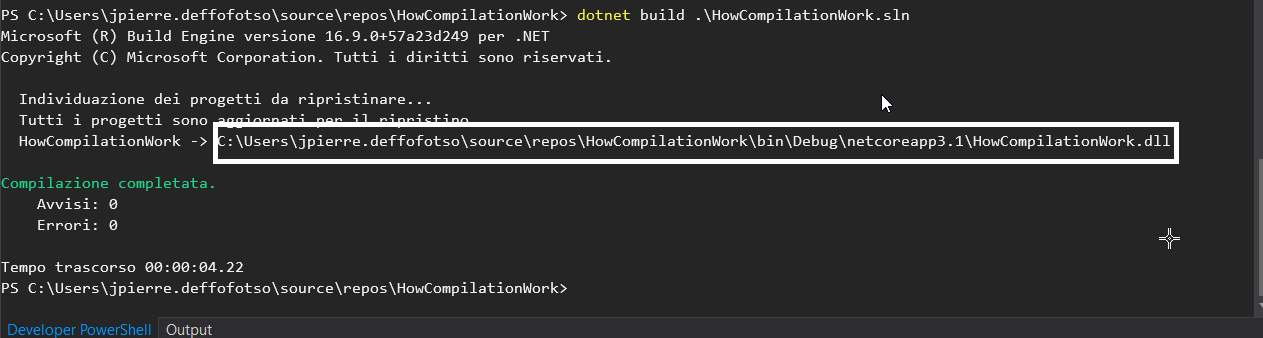
To compile in release mode through the command line, append the
— Configuration release flag to the command. Alternatively, or if you wan within Visual Studio, select debug or release mode from the drop-down list. This is the easiest, quickest, and the likeliest way you will compile your code.
At this point, the C# high-level code is compiled into an executable file containing the Intermediate Language code.
At this point, your job as developer is done, The code is in an executable form. From a technological perspective, the journey is just getting started. The C# code is statically compiled down to Common Intermediate Language, but IL cannot be run by the operating system,But how do you get from IL to native code? The missing piece is the Common Language Runtime (CLR). This part of .NET core translates Common Intermediate Language to native code. It is the “runtime” of .NET. We can compare the CLR to the Java Virtual Machine (JVM). The CLR has been part of .NET since the very beginning. It is also good to note that with the movement toward .NET Core and .NET 5, a new implementation of the CLR is taking the place of the old CLR: CoreCLR. The explanations we are doing here regarding the CLR are valid for both the traditional CLR and CoreCLR, and the term CLR is used for both the regular Common Language Runtime and CoreCLR.
Any code that is written using an implementation of a technical standard called Common Language Infrastructure (CLI), such as .NET core (.net 5), can be compiled down to Common Intermediate Language. The CLI describes the infrastructure behind.NET, whose specific flavors are implementations of the CLI themselves, and gives languages a basis around which to form their type system. Because the CLR can take any piece of Intermediate Language (IL), and the .NET compiler can generate this IL from any CLI-compliant language, we can have IL code generated from mixed-source code. C#, Visual Basic, and F# are the most common .NET programming languages.
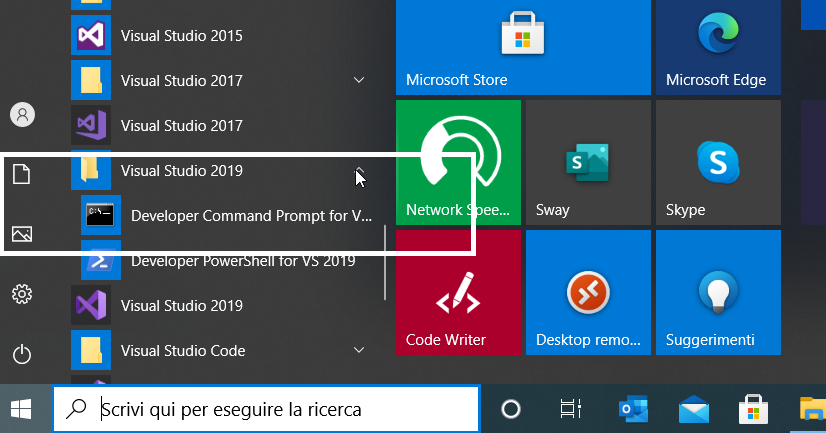
Because the compiler embeds IL in files, we need to use a disassembler to view the CIL. All .NET flavors come with Microsoft’s own dissembler called ILDASM (Intermediate Language Disassembler). To use ILDASM, we need to run the Developer Command Prompt for Visual Studio, which is installed alongside Visual Studio. This is a command-prompt environment that gives us access to .NET tools. Be aware that ILDASM is available only for Windows.
open visual studio command prompt as in the image bellow:
Navigate to he solution folder in he bin follder of solution folder of this demo:
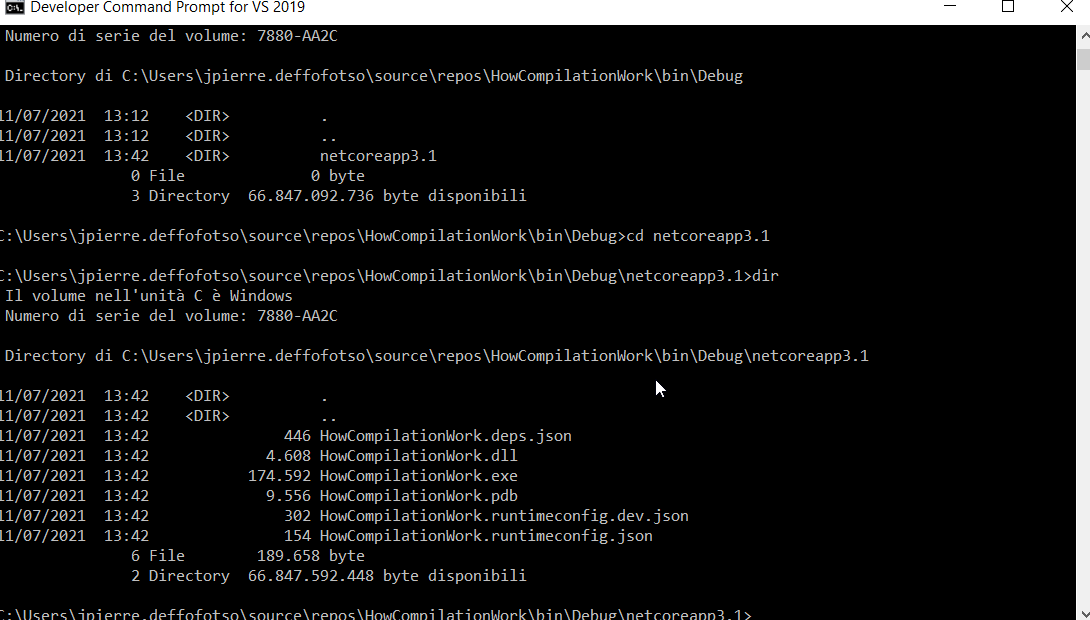
Fire this command :
ildasm HowCompilationWork.dll /output:HowCompilationWork.il
this command will create a file with .il exension as in the image bellow:
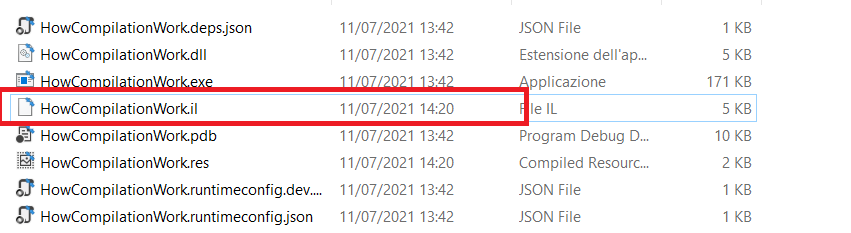
in this file you can see what the IL look like:
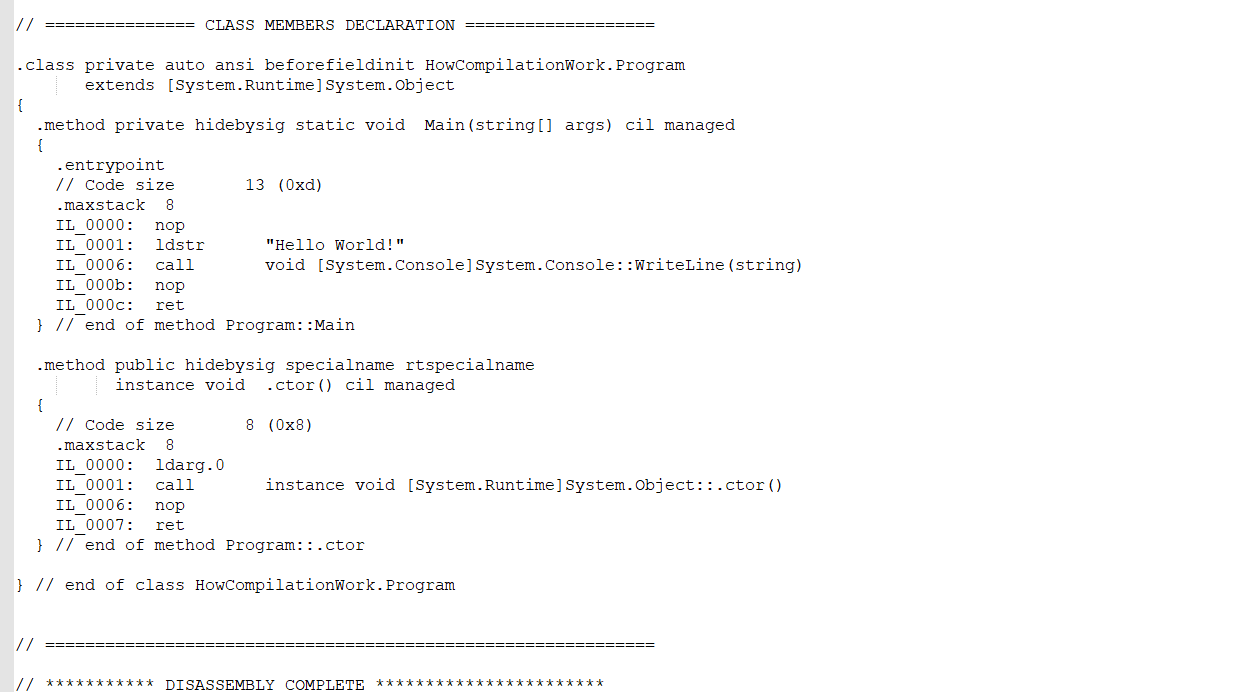
If you have ever worked in or seen assembly-level programming, you might notice some similarities. Common Intermediate Language is definitely harder to read and more “close to the metal” than regular C# code, but it is not as mysterious as it might look. By stepping through the IL line by line, you see that this is just a different syntax for programming concepts you already know. The IL code generated by the compiler on your machine may look slightly different (especially the numbers used with the ldarg opcode), but the functionality and types of opcodes should be the same.
The last step in the compilation process is the conversion from Common Intermediate Language to native code. Until now, the code has been statically compiled, but that changes here. When .NET core executes an application, the CLR launches and scans the executable files for the IL code. Then, the CLR invokes the JIT compiler to convert the IL into native code as it runs. Native code is the lowest level of code that is (somewhat) human-readable. A processor can execute this code directly because of the inclusion of predefined operations (opcodes), similar to how Common Intermediate Language includes the IL operation codes.

JIT compiling our code comes at a performance cost, but also means that we can execute .NET-based code on any platform supported by the CLR and a compiler. We can see this in practice with .NET Core and the new CoreCLR. The CoreCLR can JIT-compile Intermediate Language to Windows, macOS, and Linux as show in the image bellow taking from the great book code like a pro in c# . Compiler Because of the JIT nature of this compilation step, viewing the actual native code is a bit tricky.The only way to view native code generated from your Intermediate Language would be to use a command-line tool called ngen, which comes preinstalled with .NET 5. This tool allows you to generate CIL so-called native images containing native code from the Common Intermediate Language stored in a PE file ahead of time. The CLR stores native code output in a subfolder of %SystemRoot%/Assembly/NativeAssembly (only available on Windows). Beaware , however, that you cannot use the regular file explorer to navigate here, nor would be resulting output be legible.After running ngen, the CLR sees that the IL is already compiled (statically) to native code and executes based on that. This comes with the expected performance boost; however, the native code and IL code can get out of sync when a new build is released and have unexpected side effects if the CLR decides to use the older statically compiled native image instead of recompiling the new, updated code.
In day-to-day operations, you likely don’t touch IL all that much or are overly concerned about the IL-to-native-code compilation. However, understanding the compilation process is a fundamental block of knowledge because it sheds light on design decisions in .NET 5 that all developer need to know.
Hope this post will be useful for you and help you be very comfort while working in donet ecosysthem. like and share

@issa abdoul razak Il/CIL/MSIL designent tous la meme chose : le code intermediaire produit par le compilateur dot.net donc partout ou tu vois intermediate language, common intermediate language ou microsoft intermediate language c'est la meme chose.. c'est l'equivalent du bytecode java qui est compilé en runtime en jit en code machine par la CLR de dotnet..
05.10.2022, 20:36
y'a til une quelconque difference entre IL et CIL?
05.10.2022, 16:26

Subscribe to Aide En Informatique's newsletter to receive the latest news and exclusive offers.
12.08.2022, 17:03
Comments: 0
12.08.2022, 17:04
Comments: 0
17.08.2022, 22:01
Comments: 0
31.08.2022, 17:12
Comments: 0
Bienvenue sur ITInnov-Design, l'espace des informaticiens, l'espace du codage, le lieu par excellence ou on essaye d'expliquer les choses complexes de manière Simple et surtout Terre à Terre pour permettre à tous ceux qui veulent s'avventurer dans le monde de l'informatique et du coding de ne pas etre frustré et d'entrer par la grande porte. Tous nos postes sont vos préoccupations et tout commentaires de votre part peut etre l'objet d'un autre post pour mieux eduquer, mieux approffondire et du coup n'hesitez pas à faire des questions, des remarques des suggestions dans tous nos canaux de communication de manière qu'on puisse aborder beaucoup de sujet meme de manière repetitives car, on peut expliquer la meme chose plusieurs fois de plusieurs manières differentes: en Informatqiuey, Qui Maitrise mieux son Sujet doit pouvoir l'expliquer de manière simple à un débutant Ou à une persone qui est nouveau ou ignorant sur le sujet c'est notre objectif.

LarrySig Guest
24.05.2024, 18:18
Post: Comment fonctionnent Internement les guichets automatiques ?
Orvilledop Guest
22.05.2024, 00:57
Post: Comment fonctionnent Internement les guichets automatiques ?
Orvilledop Guest
15.05.2024, 16:04
Post: Comment fonctionnent Internement les guichets automatiques ?
Franck Guest
14.05.2024, 19:34
Post: Comment deployer un site web statique sur github?